
Ford DiagNow
Ford Motor Co.Auto & Vehicles
4.1147.00 Reviews
- Version
- 7.4.61
- Installs
- 100.00K
- Age Rating
- Everyone
Screenshots
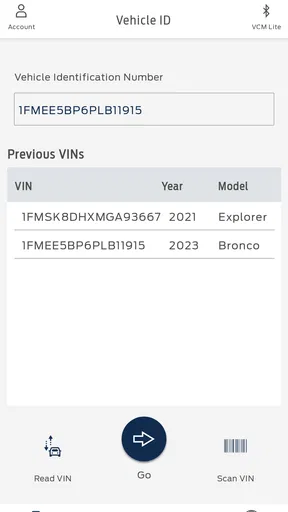
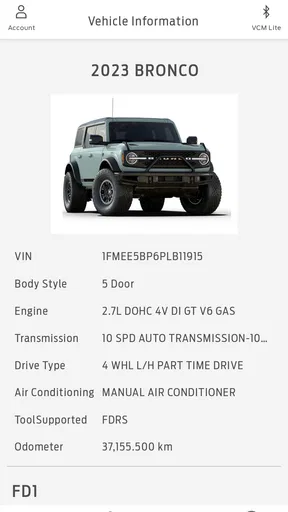
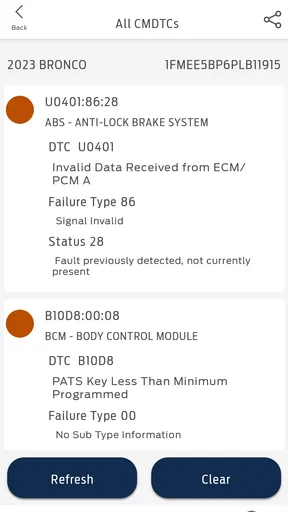
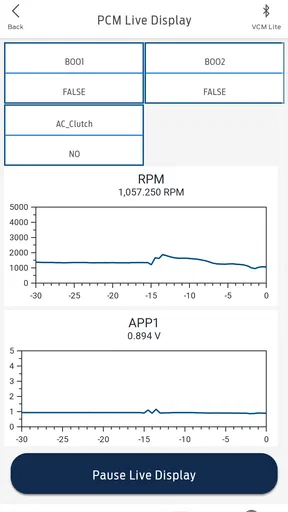
Our Review of Ford DiagNow
 Analysis by Appyee
When a Ford vehicle starts behaving strangely, the hardest part is often not noticing the problem but deciding what to do next. A warning light, an intermittent fault, or a complaint that disappears before reaching a workshop can leave you with very little useful information. Ford DiagNow is designed for that first diagnostic step: it is a free Android app from Ford Motor Co. focused on mobile vehicle diagnostics. I see it as a practical tool for people who need to turn a vague vehicle symptom into a clearer starting point for further inspection.
My experience with it is best understood as a workflow rather than as a complete repair solution. You begin with a vehicle problem, use the app to gather diagnostic information, and then pass that information to the person or service responsible for the next decision. That distinction matters. Ford DiagNow is most useful when it improves the handoff between a vehicle and a technician, not when you expect it to replace a workshop.
From a vague warning to a usable diagnostic starting point
The app belongs in the Auto & Vehicles category, but it feels more specialized than a typical driving companion. It is not primarily about navigation, fuel prices, trip logging, or vehicle reminders. Its purpose is closer to a mobile diagnostic aid for Ford vehicles, which makes the starting condition very specific: something about the car needs checking, and you want more than a guess based on sound, smell, or a dashboard symbol.
That focus is also why I would not install it simply because I own a Ford. It becomes valuable when there is a concrete reason to investigate the vehicle. For example, imagine leaving work and seeing a warning indicator appear. The car still starts, so you drive home rather than calling for immediate assistance. At home, you use the app as part of the information-gathering stage, record what you observe, and prepare a clearer explanation for a technician. The benefit is not necessarily that you fix the issue in the driveway; the benefit is that the next conversation starts with better evidence.
The application is free, carries an Everyone content rating, and is available for devices running Android five point zero or later. That makes the entry barrier relatively low for many Android users, especially compared with buying a dedicated diagnostic device before knowing whether it will actually help. Its current version is 7.4.61, so anyone installing it should still treat compatibility as a practical first check on an older phone rather than assuming every device will behave identically.
Ford DiagNow has an average rating of 4.1 from around 858 ratings, with 147 written reviews. It has also passed 100K installs. Those figures suggest that the app has found a real audience, but they do not turn it into a universal diagnostic authority. A vehicle app can be useful and still depend heavily on the particular Ford model, the phone, the connection method, and the person interpreting the result.
Preparing before opening the diagnostic session
The most overlooked part of this kind of workflow happens before the app is opened. I would first write down the exact symptom: when it appears, whether the engine is cold or warm, whether it happens during acceleration or braking, and whether the warning remains visible. This takes a minute and prevents the diagnostic result from becoming detached from the real driving problem.
I would also keep the vehicle stationary in a safe place and avoid treating the phone as a reason to continue driving a car that feels unsafe. If the vehicle is losing power, overheating, producing smoke, or showing a serious warning, a mobile diagnostic tool should not override common-sense safety decisions. The app can help organize information, but it cannot make a dangerous vehicle safe to operate.
A useful preparation trick is to separate two questions: What is the vehicle reporting? and What is the vehicle actually doing? The first question belongs to the diagnostic process. The second comes from your observations. Keeping both notes gives a technician more context than a fault message alone, particularly when the symptom is intermittent.
Moving through the app instead of guessing at the fault
Once I start the process, I treat each screen as a step in collecting information rather than as a verdict. The important habit is to read the result in context. A diagnostic indication can point toward a system or condition, but it does not automatically identify the failed physical part. That is a crucial trade-off compared with the simple promise of “scan and repair” often associated with vehicle apps.
For an everyday owner, the best outcome is a more precise handoff. Instead of saying, “The car felt wrong,” you may be able to explain that a warning appeared, describe the driving conditions, and share the diagnostic information produced during the session. That can help a workshop decide what to inspect first. It can also prevent a common mistake: replacing an expensive component solely because its name appears in a diagnostic result.
I recommend keeping a short record immediately after the session. Note the date in your own maintenance log, the warning or symptom, whether it was present before and after the check, and any information the app presents. This is one of the less obvious ways to get more value from a diagnostic tool. The app may help with the current event, but your notes preserve the history that a single scan cannot provide.
Another useful approach is to repeat your description consistently when speaking to a technician. Do not translate a result into a confident mechanical diagnosis unless you understand exactly what it means. Say what happened, what the app displayed, and what changed afterward. That wording keeps the handoff honest and reduces the chance that a tentative indication becomes an inaccurate repair instruction.
The handoff from phone to technician
This is where I think Ford DiagNow has its clearest practical role. A phone-based diagnostic session sits between the owner’s first observation and professional workshop work. The owner supplies the symptoms and vehicle context. The app helps structure the diagnostic information. The technician then decides which tests, inspections, or repairs make sense.
That handoff is valuable for drivers who are uncomfortable with automotive terminology. You do not need to explain every possible cause of a warning light. You can bring a concise account of the event and identify what the app showed. The technician still needs to verify the issue, but the initial conversation is less dependent on memory.
It is equally important not to overstate what you are handing over. A screenshot or written note is not the same as a complete workshop report, and a mobile application is not a substitute for physical inspection. A loose connector, damaged wiring, fluid leak, worn component, or mechanical noise may require attention that software cannot establish on its own. The app improves the information flow; it does not remove the need for skilled judgment.
For someone managing several vehicles, the handoff can become more complicated. I would be careful to identify which vehicle was checked and keep the information attached to the correct maintenance record. Confusing one car’s symptom with another’s can create more friction than the app removes. This is especially relevant in households where multiple Ford vehicles are used by different people.
What a successful session looks like
A successful result is not necessarily a repair completed at home. In my view, success means leaving the session with a clearer next action. That might be arranging a workshop inspection, deciding that a non-urgent symptom needs monitoring, or recognizing that a warning should not be ignored. The value is in reducing uncertainty enough to make a sensible decision.
Consider the earlier after-work scenario. The warning appears, but the car remains driveable. You inspect the situation safely, use the app to gather diagnostic information, and write down the conditions under which the warning appeared. The next morning, you can explain the event to a service professional without relying on a vague memory. If the warning disappears, your record still matters because intermittent problems are easy to dismiss until they return at a worse time.
The app is also a better fit for owners who want to participate in maintenance without pretending to be mechanics. You can learn the vocabulary around your vehicle and ask more focused questions. For instance, rather than asking whether the car is “broken,” you can ask what the reported condition means, whether it needs immediate attention, and what additional inspection would confirm the cause.
This is where the developer matters. Ford Motor Co. is not an anonymous third-party publisher building a general-purpose scanner for every brand. The Ford connection gives the app a clear identity and makes it more relevant to Ford owners than a generic vehicle utility. At the same time, that focus means I would not choose it as my only tool for a mixed-brand household or for someone who regularly works on vehicles from many manufacturers.
Where the usual alternatives are stronger
The most obvious alternative is a generic diagnostic app paired with a separate vehicle interface. That route may appeal to experienced users who want broad brand coverage, live data, customization, or a familiar process across different cars. The trade-off is that it usually introduces another device, another compatibility question, and more responsibility for interpreting technical information.
A workshop’s professional diagnostic equipment is a stronger choice when the fault is persistent, safety-related, or difficult to reproduce. A technician can combine electronic information with a physical inspection and repair experience. Ford DiagNow is not competing with that complete service; it is useful earlier in the chain, when you need to organize the problem or decide how urgently to seek help.
There is also the traditional alternative of doing nothing until the vehicle becomes obviously undriveable. That costs nothing at first, but it can turn a manageable warning into a stressful breakdown and leaves the technician with less history. I prefer using the app as an early information tool, provided the driver understands that a result should lead to a decision, not to automatic reassurance.
For a technically confident owner, a dedicated scanner may offer deeper control. For a casual driver, however, specialist hardware can be intimidating and may encourage overconfidence after displaying a code. Ford DiagNow’s advantage is the lower commitment of starting with a phone. Its weakness is that the phone alone does not provide the same physical access, measurement depth, or professional interpretation as a complete diagnostic setup.
Where the workflow breaks down
The first point of friction is compatibility between the app, the phone, and the vehicle situation. The minimum Android requirement is modest, but that does not guarantee a smooth experience on every older handset. A phone that struggles with general connectivity or has limited storage may make a diagnostic session more frustrating than expected. I would install and test it before an urgent problem rather than waiting until the dashboard is already full of warnings.
The second break occurs when users expect a single result to name the failed part. Vehicle faults can have several causes, and electronic reporting often identifies a condition rather than proving the repair. If the app points toward a system, treat that as a direction for inspection. Do not buy parts immediately based only on the first interpretation.
The third break is the handoff itself. Information is only useful if it is preserved and communicated clearly. If you close the session, forget the symptom details, or tell a technician only that “the app said it was the sensor,” you lose much of the benefit. My practical advice is to keep the original wording visible, write down the circumstances, and ask what additional confirmation is needed.
The workflow can also fail when the user treats convenience as permission to ignore safety. A free mobile tool is easy to open, but that does not make every warning a minor issue. If the car behaves dangerously, the correct next step may be roadside assistance or a professional inspection rather than another attempt to interpret the phone.
Finally, this is not the right choice for someone looking for a complete maintenance manager, a driving tracker, or a universal scanner. Its identity is narrower: mobile diagnostics for Ford vehicles. That narrowness is a strength when it matches your need and a limitation when it does not.
Who should install it
I would recommend Ford DiagNow to a Ford owner who wants a convenient first step when a warning or unusual behavior appears. It is particularly suitable for someone who wants to communicate more clearly with a workshop, keep better records, or understand whether a problem deserves prompt attention. The free price also makes it easier to try before spending money on dedicated hardware.
I would be more cautious about recommending it as the main tool for a professional technician, an advanced hobbyist seeking deep live-data control, or a driver responsible for several brands. Those users may be better served by equipment chosen for broader coverage or more detailed workshop functions. The app can still be a useful part of their process, but it should not be mistaken for the entire toolbox.
Newer drivers should remember that diagnostic information is not the same as mechanical training. The app can help you ask better questions, but it should not pressure you into repairs you do not understand. If a result is unclear, the sensible move is to show it to a qualified professional and ask what would confirm the cause.
My final take on the complete journey
Ford DiagNow works best when I use it as a bridge: a vehicle produces a symptom, the phone helps collect structured information, and a technician or informed owner turns that information into the next action. The strongest part of the experience is this improvement in the starting conversation. The weakest part is the temptation to treat a diagnostic indication as a final answer.
With its Ford Motor Co. development, free access, Everyone rating, and a current version of 7.4.61, it is an approachable option for Android users who own a compatible Ford vehicle and want mobile diagnostic support. Its audience has grown beyond 100K installs, and the 4.1 average shows a generally positive reception, though the app still deserves realistic expectations.
My recommendation is simple: use it to reduce uncertainty, document what happened, and prepare the next handoff. If you need a universal scanner, a complete repair environment, or certainty without professional verification, choose a different solution. If your goal is to begin a Ford diagnostic workflow from your phone and arrive at the workshop with a clearer story, this app is worth keeping available before the next warning light appears.
Verdict
Strengths of Ford DiagNow
- Supports detailed diagnostics for many Ford vehicle systems.
- Can help identify fault codes before visiting a repair shop.
- Useful for technicians and experienced DIY vehicle owners.
- May provide faster access to vehicle diagnostic information.
- A focused tool for Ford vehicles rather than a generic scanner app.
Limitations of Ford DiagNow
- Compatibility may vary by Ford model, year, and connected hardware.
- Requires suitable diagnostic equipment or an OBD connection to work.
- Advanced functions can be confusing for inexperienced users.
- Some features may require payment, registration, or additional tools.
- Incorrect settings or commands could affect vehicle systems.
Similar Picks in This Category
View All
Android Auto
Google LLC4.1

maxim — order a taxi & food
PT. SITO4.7

Штрафы ГИБДД: проверка с фото
Pays LLC – Штрафы ГИБДД4.7

Номерограм – проверка авто
Авто Ассист4.8

Дром Авто
Дром4.9

Frequently Asked Questions
What is Ford DiagNow and what can it be used for?
Ford DiagNow is a diagnostic application designed to help users access vehicle information and perform selected diagnostic functions on compatible Ford vehicles. Depending on the vehicle, interface, and available subscription or service access, it may display fault codes, live data, module information, and testing options. It should be viewed as a support tool rather than a complete replacement for professional workshop equipment.
Is Ford DiagNow compatible with every Ford vehicle and mobile device?
No. Compatibility can depend on the Ford model, production year, control modules, diagnostic protocol, operating system, and the adapter used to connect the vehicle. Before downloading, users should check the application’s current compatibility list and confirm that their Android or iOS device meets the required software version. Some functions may also be unavailable on particular vehicles, even when the app connects successfully.
Do I need additional hardware to use Ford DiagNow?
In most cases, a compatible vehicle diagnostic interface or adapter is required because the app needs a connection to the vehicle’s OBD or diagnostic port. The adapter may communicate with the phone through Bluetooth, Wi-Fi, or another supported method. Users should verify that the hardware is approved for Ford DiagNow, since an incompatible or low-quality adapter can cause connection failures, incomplete readings, or unreliable diagnostic results.
Is Ford DiagNow free, or does it require paid features or subscriptions?
The download price and available functions may vary by platform, region, vehicle, and service plan. Some basic tools may be accessible without payment, while advanced diagnostics, manufacturer-level functions, technical data, or extended access may require a subscription, in-app purchase, or compatible professional account. It is advisable to review the app-store listing and pricing information carefully before connecting the application to a vehicle.
Can Ford DiagNow safely repair problems or clear warning lights?
Ford DiagNow may help identify diagnostic trouble codes and, where supported, perform actions such as clearing codes or running service procedures. However, clearing a warning light does not repair the underlying fault, and some functions can affect important vehicle systems. Users should record codes before deleting them and avoid changing module settings unless they understand the procedure. For safety-critical issues, professional diagnosis and repair are recommended.
